
Video Creation
How do I Create a Video From My Images?
To generate a video:
- Log in to your PhotoAIVideo account
- Click Create New Project
- Upload your images by:
- Dragging and dropping into the upload area, or
- Clicking Select Images
- Upload up to 20 images per project
- Click Generate Videos
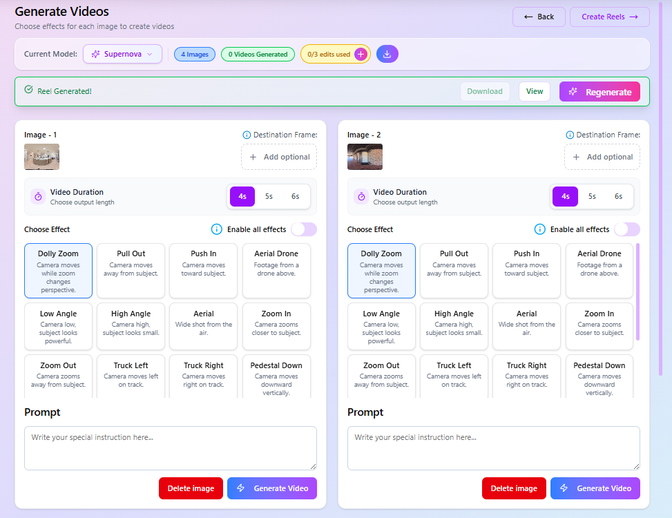
Once your photos are generated, you will be taken to the Generate Videos screen where you can:
- Set the video duration (4s, 5s, or 6s) for each image
- Choose from different camera effects (e.g., Dolly Zoom, Pull Out, Push In, Aerial, etc.)
- Enable or disable effects for all images
- Add a custom prompt to guide how the video is generated
- Regenerate videos for individual images if needed
- Delete or replace images
- Download or preview generated videos
- Click Create Reels to combine videos into a final reel.